Claude Code Gets 50% Cheaper When It Talks Like a Caveman
A developer discovered that forcing Claude Code to respond in terse, caveman-like language cuts token output in half. It sounds absurd. The cost savings are measurable.
April 10, 2026
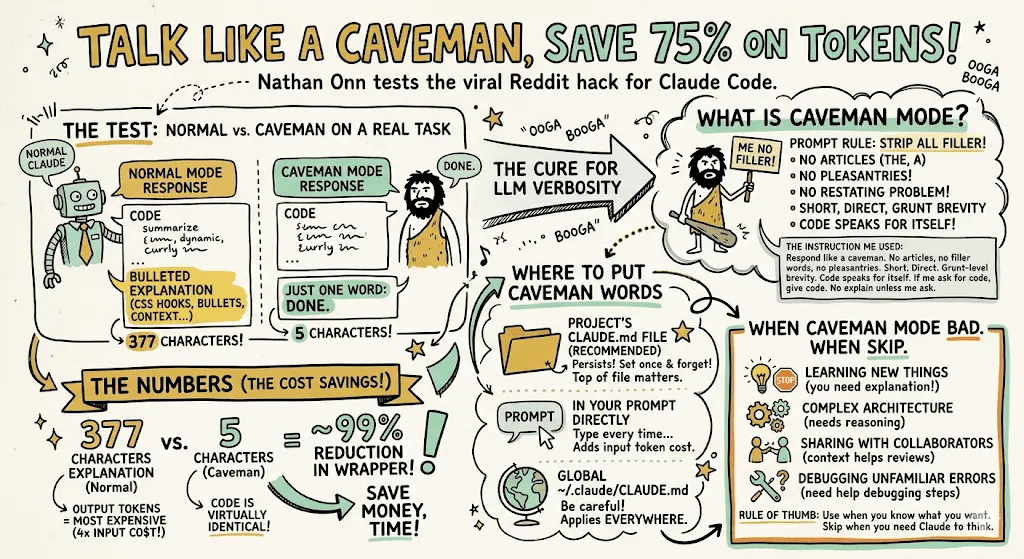
A developer is three hours into a coding session. They ask Claude Code to rename a variable and fix an indentation issue. Claude responds with 600 tokens of context, explanation, code review, edge case analysis, and a note about the broader refactoring opportunity this opens up. The developer reads none of it. They just wanted the fix. Julius Brussee looked at that pattern and asked a direct question: what if Claude just said "fix done" and stopped there?
His answer is a GitHub repo called caveman. It forces Claude Code to respond like a stone-age hunter - broken sentences, no articles, no explanations, only results. The response to "rename this variable" becomes "done." Token usage drops 40-50% on execution-mode sessions. The repo hit 373 points on Hacker News and a lot of developers recognized the problem immediately.
How a seven-word instruction cuts your bill in half
Claude supports a feature called skills - custom behavioral instructions stored in a CLAUDE.md file that reshape how the model operates during a session. Developers use these for legitimate technical purposes: enforce test coverage, prefer immutable patterns, always add type annotations. Brussee used it for something blunter.
The full instruction is: "respond like a caveman from the stone age." That is the entire thing. Seven words. The effect on output is substantial. Claude drops definite articles, prepositions, transitional phrases, and all explanatory text. A response that previously ran 500 tokens now runs 80. Same action, fraction of the output.
This works because Claude's default behavior optimizes for something that costs money in execution-mode work: helpfulness through explanation. When you are still learning the codebase, explanations are valuable. When you have been working in it for hours and you know exactly what you want done, the explanation is overhead. Caveman mode eliminates the overhead without changing the action.
When to use it and when not to
The constraint is real. Forcing minimal output also compresses chain-of-thought reasoning. On straightforward tasks - renaming, reformatting, obvious linting fixes, simple refactors - this does not matter. The task is simple enough that truncated reasoning still reaches the right answer.
On hard problems, it fails. A subtle race condition in concurrent code, a security vulnerability involving multi-step logic, an architectural decision with non-obvious tradeoffs - these require Claude to reason through the problem before acting. Caveman mode cuts that reasoning short. You get a faster, cheaper response that is more likely to be wrong.
The useful cases:
- Routine refactors - renaming, reorganizing, reformatting
- Linting error resolution where you already know what is wrong
- Status checks and progress reports
- Mechanical tasks where you are reviewing the output anyway
- Repetitive operations across many similar files
The cases to avoid it:
- Debugging logic errors you have not yet identified
- Security reviews or vulnerability analysis
- Architecture work involving tradeoffs
- Any situation where you need Claude to explain its reasoning before you accept the result
The real problem this exposes
The caveman skill is absurd and effective, and those two things point at the same underlying issue: Claude's default output is calibrated for a user who wants explanation. That is appropriate for a general-purpose assistant. It is poorly matched to a power developer running execution-mode sessions on code they already understand.
The token cost of over-explanation is not trivial. Output tokens are priced identically to input tokens at the API level. A session generating 50,000 output tokens in explanation text that the developer ignores costs the same as 50,000 output tokens of useful code. At scale, this is a meaningful bill line that the caveman skill directly attacks.
Other approaches to the same problem: write CLAUDE.md instructions that are deliberately short (every word gets re-sent as context on each request), break large tasks into smaller sessions to avoid inflating context windows, interrupt Claude before it starts a long explanatory block. Caveman mode is just the most aggressive version of the same principle - trade explanation for efficiency.
Important caveat
Test caveman mode on tasks you can verify yourself. The cost savings are only worth it if the code quality holds. Skipping explanation does not mean skipping correctness - but it does mean you are the last checkpoint on whether the result is right.
What this tells you about AI tool pricing
The sticker price for Claude Code subscriptions is not the real price. The real price is sticker price multiplied by how verbose Claude is with your specific workflow. You control more of that cost than you might think. Caveman mode is visible because it is extreme. But the underlying principle - that prompt engineering directly affects your bill - applies to every workflow.
Compare this to Claude versus ChatGPT cost discussions, which usually focus on subscription tier. The more relevant comparison for heavy users is output verbosity per session. A model that explains everything costs more to operate than one you can tune to be terse.
Verification checklist: before deploying caveman mode on your workflow
- Run one session with caveman mode on a task you understand completely
- Verify every code change manually - you are removing the explanation safety net
- Record token counts before and after to confirm actual savings
- Confirm the task type is execution-mode, not reasoning-mode
- Keep a non-caveman session open for anything ambiguous or novel
- Check that your CLAUDE.md does not conflict with the caveman instruction
- Review output quality over 5-10 uses before treating it as a default
Some links in this article are affiliate links. Learn more.