Claude artifacts now install as Mac and Windows apps. Each edit resets the permissions you allowed.
Anthropic's Install as app beta, out November 24 on every Claude plan, turns artifacts into desktop apps with optional menu bar and full computer access. How it works, admin controls, and how ChatGPT Sites, AI Studio and Replit compare.
November 25, 2026
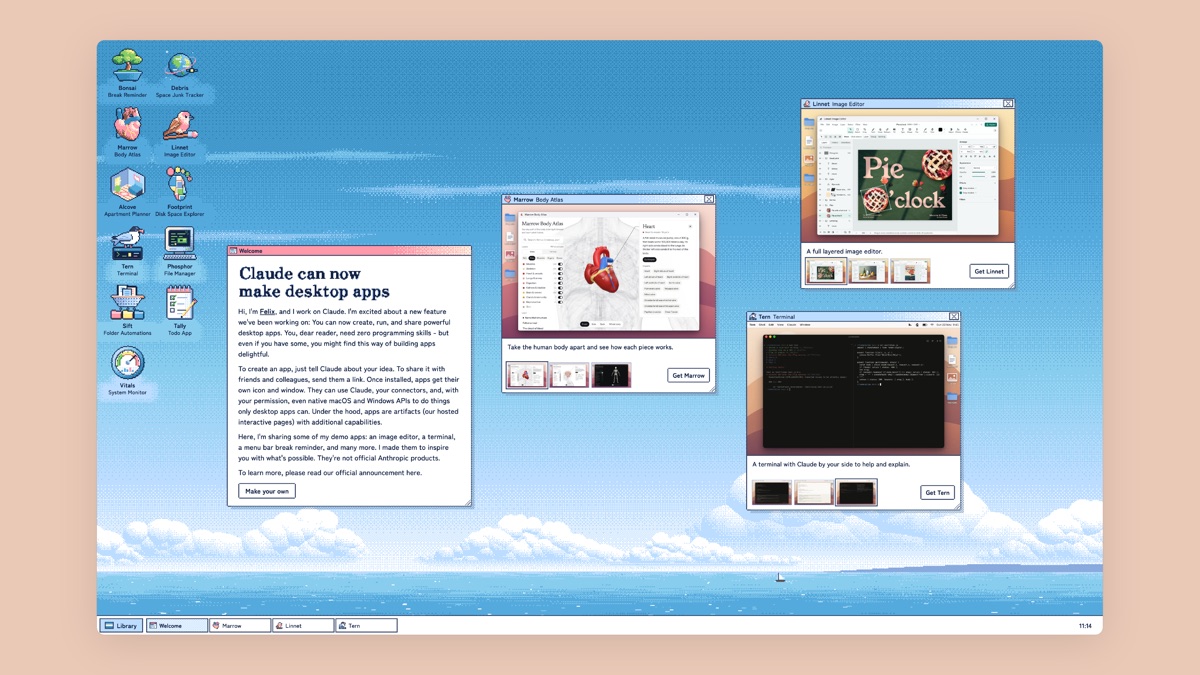
Anthropic began rolling out Install as app on November 24, 2026, a beta that turns an artifact Claude builds into a Mac or Windows app with its own icon and window. With your permission, an installed app can send notifications, sit in the menu bar or system tray, or get full access to run programs and change files. It is open on every Claude plan, from Free to Enterprise, and needs Claude for Mac or Windows version 6.28899.0 or later, according to the help center. There is nothing to package or sign and no API key; the app runs on your Claude account, so building it and its calls to Claude count toward your plan's usage limits.
What to build, and how to install it
Anthropic pitches Install as app for tools you open every day, like a meeting prep page that pulls from your calendar and email. Its staff built an image editor (Linnet), a file manager (Phosphor), a folder organizer (Sift), a terminal (Tern) and a system monitor for the menu bar or tray (Vitals).
- Build and install. Describe the app in a chat (one of Anthropic's examples: "Make a Pomodoro timer that lives in my menu bar."), open the artifact in the main Claude Desktop window, then choose Install as app from its title menu, its right-click menu or Share, and confirm.
- Open it. On a Mac it lands in a Claude Apps folder inside your home Applications folder and shows up in Spotlight. On Windows it goes in a Claude Apps folder in the Start menu, plus a desktop shortcut.
- Remove it. In Claude Desktop, go to File > Apps, select the app and choose Uninstall. That clears the permissions you granted; the artifact itself stays.
What an installed app is, and what it is not
- The same artifact in a new window. When you or another editor changes the artifact, the app changes too.
- Online only. You need to be online and signed in to Claude Desktop to open an app.
- Connectors and saved data follow the artifact rules. An app can use Claude and your connectors "the same way the artifact does," and Anthropic's artifacts help article lists connected apps and stored data for Pro and up, not Free.
- Not a browser shortcut. "Add to Dock" or "Add to Home Screen" in a browser adds a shortcut without any of these desktop features.
Some artifacts cannot be installed: anything made from a template (Docs, Slides, Sheets), legacy artifacts made before September 16, 2026, and live artifacts from Claude Cowork, the desktop agent we covered at its launch. Apps are not available on Linux, the web or mobile, even though Claude Desktop has a Linux beta.
Three permission levels, and why every edit asks again
By default an installed app can do only what it could do in a browser. Anything more is a prompt you answer with Allow or Don't allow:
- App permissions: notifications, keyboard shortcuts that work in other apps, floating over other windows (which also lets the app read where your cursor is), and a menu bar item on macOS or a tray icon on Windows.
- Full access to this computer: run programs and read, change or delete your files without asking each time.
An Allow covers one version of the app, so after any update, including your own edits, Claude asks again. Anthropic flags one gap itself: if an app loads code from another site, that code can change without a new request. Full access is limited to apps you made or, on Team and Enterprise, apps made by people in your organization. Claude generally blocks the request if someone outside your organization wrote part of the app, and on Free, Pro, Max and Ultra that means anyone other than you.
"Only allow it if you trust everyone who wrote the app. Anthropic doesn't review apps before you install them." (Claude Help Center)
You can revoke a permission from the app's Permissions menu. Turning off full access stops the programs the app started, except ones that separated themselves from it, and does not undo changes already made.
Before you install your own:
- Stay at the default level when you can. A dashboard, calculator or form usually needs nothing more. File work, like the help page's example of an app that renames photos in a folder by date, is what full access is for.
- Treat a new prompt as a code change. If others can edit the artifact, their changes reach your installed copy, and a repeat permission request means the code changed.
- Watch your limits. An app that calls Claude on a timer draws from the same limits as your chats.
- Mind data retention. Zero data retention does not cover these apps, even in organizations that have it.
Controls for Team and Enterprise admins
The Artifacts admin guide lists three settings under Organization settings > Artifacts: Install as app and App permissions (both on by default for Team, off for Enterprise) and Full access to the computer (off on both). Changes take up to about an hour. MDM keys (isArtifactAppsEnabled, isArtifactAppPermissionsEnabled, isArtifactAppFullAccessEnabled) can switch each level off for every account on a computer, and the stricter setting wins. HIPAA-ready and hybrid deployments cannot turn the feature on, and K-12 organizations cannot enable full access. Opening an app is logged as an artifact view in the Compliance API, but installs, permission answers and what an app does on the computer are not.
How ChatGPT, Google and Replit turn AI-built tools into apps
- ChatGPT Sites: describe a website, web app or game and publish it. OpenAI's help center says Sites is on Plus, Pro, Business and Enterprise, not Free or Go. Hosting is free through January 31, 2027; from February 1, Plus, Pro and Business pay for use above a monthly allowance (125 credits on Plus, 375 on Pro), per the usage page.
- Google AI Studio: Build mode makes a full-stack web app or a native Android app. Publishing runs it on Cloud Run at a public URL, with up to two apps on the Starter Tier for eligible accounts without a billing account. When you share an app, its API calls count toward your usage limits.
- Gemini Canvas: apps share through a public link that opens only in gemini.google.com, and anyone with it "can view and edit data associated with the app," per Google.
- Replit: publishing creates a deployment on a .replit.app domain with public, password, workspace or invite-only access. It is on every plan, but Starter's one published app expires after 30 days, per Replit's docs.
Those routes end in a link you share. Install as app gives you something closer to a native utility, but only for people who run Claude Desktop and sign in. For the assistants themselves, see ChatGPT vs Claude.
What Anthropic has not said
- Timeline: when the beta ends, or whether it will reach Linux.
- Offline use: whether apps will ever open offline or without a Claude login.
- Distribution: neither the announcement nor the help page describes exporting an app as a standalone .app or .exe that runs without Claude Desktop.
- Models and cost: which Claude model an app's requests use, or how much of a limit a typical call takes.
- Screening: Anthropic does not review apps before install; the reporting route it describes is "Report Artifact" in the Permissions menu, where available.
Tools mentioned in this article
Some links in this article are affiliate links. Learn more.