Developer trains 125M model for piano autocomplete. It runs on-device at 108 notes per second.
A transformer-based MIDI autocomplete system brings Copilot-style assistance to piano performers, running efficiently on iPhone 15 with real-time inference. The 125M-parameter model demonstrates how code completion patterns can translate to musical performance.
August 22, 2026
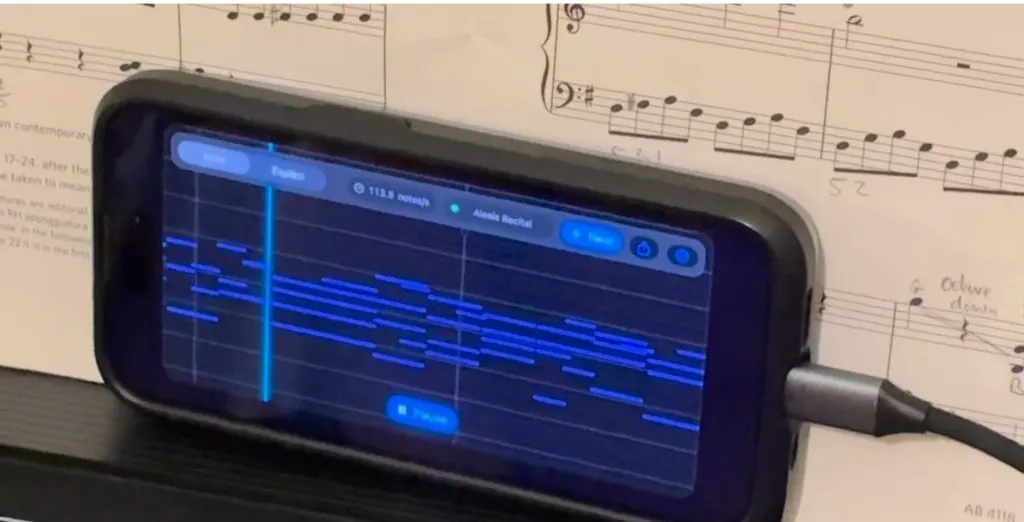
"It runs at ~108 notes per second on an iPhone 15, which is fast enough to feel instantaneous to a human player."
That line, from developer Simon Edwardsson's write-up on the project, is the one worth sitting with. Not because 108 notes per second is a magic number, but because it defines the only threshold that matters for this kind of tool: imperceptibly fast. A piano autocomplete that lags even half a second is useless. This one, at 125 million parameters, running entirely on-device on an iPhone 15, clears that bar. The architecture is a standard transformer trained on MIDI input, and the interaction model is exactly what you would expect if you had used GitHub Copilot or Tabnine: you play something, the model suggests what comes next, and you can accept or ignore the suggestion.
Why statistical next-note prediction conflicts with musical spontaneity
Start with the skeptical position, because it is a strong one. Autocomplete works in code because code has a grammar. There is a closed set of valid next tokens in most contexts, and the model is partly resolving ambiguity within a constrained space. Musical improvisation is the opposite of that. The player's next choice is almost entirely open. The "correct" continuation of a rising phrase in the right hand could be a resolution, a new motif, a rhythmic displacement, a sudden silence, or an octave leap that recontextualizes everything that came before. A model that predicts the statistically likely next note is, in a real sense, predicting the least interesting choice.
There is also the question of what MIDI captures and what it does not. Velocity and timing are there. Timbre, pedal nuance, the micro-timing of a rubato phrase: some of that survives MIDI encoding, some does not. A model trained on MIDI data is learning a compressed and quantized representation of music, not music. Whether that compression destroys the signal that would make completions feel musical rather than mechanical is not an abstract concern. It is the central design problem.
And then there is the creative dependency argument. Tools that suggest continuations train users to follow suggestions. Autocomplete in code has been criticized for this reason: developers who lean on it stop building the search habits and mental models that make them good at solving novel problems. For a musician, the equivalent risk is steeper. Improvisation is the skill of generating ideas under pressure. A tool that offloads that generation, even partially, may be practicing the wrong muscle.
A concrete scenario: the bedroom producer who cannot finish a left hand
Here is where this becomes worth taking seriously as a practical artifact. Consider a producer who works primarily in a DAW and has intermediate piano skills. They can play a right-hand melody convincingly. Their left hand is weak. When they want to sketch a piano part, they either play the melody and add chords manually in the piano roll afterward, which breaks flow, or they play with both hands and the left hand sounds stiff and unconvincing.
A MIDI autocomplete running on-device changes that workflow in a specific way. They play the right hand live. The model, having seen the right hand phrase, suggests a left hand accompaniment pattern. They accept it, correct two notes in the piano roll, and move on. The session stays in motion. The creative decision that mattered, the melodic idea, was theirs. The mechanical decision, the accompanying pattern, was assisted.
This is the correct frame for evaluating the tool. Not "does it replace a pianist" but "does it eliminate the specific bottleneck that breaks flow for this person." For someone at intermediate skill level trying to sketch a complete-sounding part quickly, the answer is plausibly yes. The on-device execution matters here too. A cloud-round-trip for MIDI suggestions would introduce enough latency to destroy the live-playing feel. Running at 108 notes per second on an iPhone 15 means the latency is sub-perceptual, which is the only viable deployment for this use case.
How to decide whether this fits your workflow
The decision tree here is actually simple, but the branching matters.
If you are a trained pianist with strong improvisational skills: skip this entirely. The suggestions will land behind where your intuition already is, and the overhead of processing and rejecting them will cost more than they return. The tool is not calibrated for you.
If you are a producer or songwriter who plays piano at a functional but not fluent level: this is worth testing seriously. The specific question is whether your bottleneck is generating harmonic support for melodic ideas. If yes, a MIDI autocomplete addresses that bottleneck directly. If your problem is melodic invention itself, autocomplete in the right hand makes you dependent on suggestions for the part that should be most personal, which is the wrong trade.
If you are a developer or researcher thinking about on-device AI for creative tools: the architecture is the interesting thing. A 125M parameter transformer running at real-time throughput on consumer mobile hardware is a capability proof for a class of creative tools that have not existed before because cloud latency made them impractical. The MIDI application is one instance. The pattern generalizes to any creative input that requires sub-perceptual response times and cannot tolerate a network round trip.
If you are evaluating this as a teaching tool for piano students: the risk profile is similar to calculator use in early math education. The question of whether assistive suggestion helps or hinders skill formation in music is an open one, and this tool does not resolve it. Tread carefully and test with observation, not assumption.
"It's like pair programming but for piano"
"The mental model I kept coming back to was GitHub Copilot. You're not replacing the developer. You're giving them a fast autocomplete that covers the obvious completions so they can focus on the decisions that actually require judgment." - Simon Edwardsson, project write-up
The pair-programming analogy is useful, but it has a limit that Edwardsson does not address directly. In code, there is a ground truth: the program either compiles and runs correctly or it does not. A bad Copilot suggestion fails a test. In music, there is no equivalent filter. A statistically typical continuation is not wrong in any checkable sense. It is just uninspiring. The model has no mechanism for preferring the unexpected-but-perfect resolution over the predictable one, because unexpectedness and perfection are not properties in its training signal.
That is not a reason to dismiss the project. It is a reason to be precise about what the tool is doing. It is filling in harmonic and rhythmic scaffolding efficiently. That is valuable for the use cases described above. It is not generating musical ideas in the sense that matters to a composer. The question of whether AI tools can develop something like taste is relevant here, and the honest position is that a 125M MIDI model trained on transcriptions is not close to that threshold. What it does do, it does fast enough to be useful.
How to run and test a local MIDI autocomplete model yourself
- Read the full project write-up and clone the repository linked there. The author describes the training setup and export pipeline in enough detail to reproduce it.
- Set up a Python environment with the dependencies listed in the repo. The core inference stack is standard PyTorch; the mobile export uses
CoreMLfor the iPhone target. - If you want to test on desktop first, route your MIDI keyboard through a virtual MIDI port. On macOS, use
Audio MIDI Setupto create an IAC driver bus. On Windows, useloopMIDI. - Connect your DAW or a lightweight MIDI monitor to the same virtual port so you can see both your input notes and the model's suggested completions in a piano roll view simultaneously.
- Play a four-bar phrase at a slow tempo (60-70 BPM works well for initial testing). Observe whether the suggestions track the harmonic direction you established in bars one and two, or whether they diverge. That divergence rate is your signal-to-noise ratio for this model on your playing style.
- For iPhone deployment, follow the CoreML export steps in the write-up and sideload via Xcode. You will need a paid developer account for this step.
Verification test
After setup, play a simple I-IV-V-I chord progression in the right hand, one chord per bar, at 60 BPM. If the model's left hand suggestions track the harmonic movement across all four bars rather than suggesting the same pattern repeatedly, the context window is functioning correctly and the model is reading your input rather than defaulting to a fixed output.
This week: pull the repo, run that four-bar test, and time the latency between your last note and the first suggestion. If it is under 80 milliseconds on your hardware, the tool is worth integrating into a session workflow. If it is over 200 milliseconds, the live-playing use case is gone and you are looking at a piano roll assistant rather than a real-time companion. That single number will tell you which product you actually have. Compare what you find against the patterns that have already played out in code autocomplete - the parallels are closer than they first appear.
Tools mentioned in this article
Some links in this article are affiliate links. Learn more.