OpenClaw
The open-source autonomous AI agent that codes, browses, and executes across your machine
Editorial take
OpenClaw is the most capable free autonomous coding agent available. With 60K+ GitHub stars and an MIT license, it handles multi-step development tasks - reading codebases, browsing documentation, running shell commands - without a $500/month subscription. Terminal-only interface requires technical comfort but capabilities rival paid alternatives.
What is OpenClaw?
OpenClaw is an open-source autonomous AI agent with 60,000+ GitHub stars and MIT license. It can read codebases, write files, execute shell commands, browse the web, and chain multi-step tasks without hand-holding from your local machine. You bring your own API keys; OpenClaw supplies the agentic layer on top.
Unlike IDE plugins that wait for you to ask a question, OpenClaw operates autonomously. Give it a task like "set up this repo, write the tests, and fix any failures" and it will execute a sequence of actions to get there. It supports Anthropic Claude, OpenAI, and other providers via a unified interface, so you are not locked into any single model.
OpenClaw was created by Peter Steinberger (former founder at PSPDFKit, later joined OpenAI) and kept open source after his departure. In April 2026, Anthropic restricted Claude Code subscriptions from being used with OpenClaw. For developers who want maximum agentic autonomy without a monthly subscription, OpenClaw is one of the most capable options available.
Best for
Developers who want maximum agent autonomy without a subscription fee
Key strength
Fully autonomous multi-step execution across code, shell, and web
Score breakdown (out of 5)
What you would use it for
- →Automating multi-step development tasks from a single instruction without step-by-step supervision
- →Reading external documentation and implementing integrations autonomously
- →Setting up new codebases and running test suites without manual hand-holding
- →Executing shell commands and file operations as part of a development workflow
- →Replacing expensive autonomous coding subscriptions using your own API keys
Pros & Cons
👍 Pros
- ✓Free - only pay for API usage
- ✓Operates autonomously without requiring constant user input
- ✓Code and data stay on your machine
- ✓Large and active community (60k+ GitHub stars)
- ✓Works with any AI provider
👎 Cons
- ✗Requires technical setup and API key management
- ✗Terminal-based interface with no GUI
- ✗API costs can add up on large agentic tasks
- ✗Anthropic restricted Claude Code subscriptions from using it
Key Features
- ✓ Autonomous multi-step task execution
- ✓ Reads and edits entire codebases
- ✓ Web browsing and research capabilities
- ✓ Shell command execution
- ✓ Supports multiple AI providers
- ✓ MIT open-source license
Available on
Integrates with
OpenClaw Pricing
✅ OpenClaw has a free plan - no credit card required to start.
Open Source
- ✓Full autonomous agent capabilities
- ✓Bring your own API keys
- ✓Supports Claude, GPT-4o, and more
- ✓Runs locally - code stays on your machine
- ✓Web browsing and shell execution
- ✓MIT licensed - use it anywhere
OpenClaw vs Competitors
From the blog
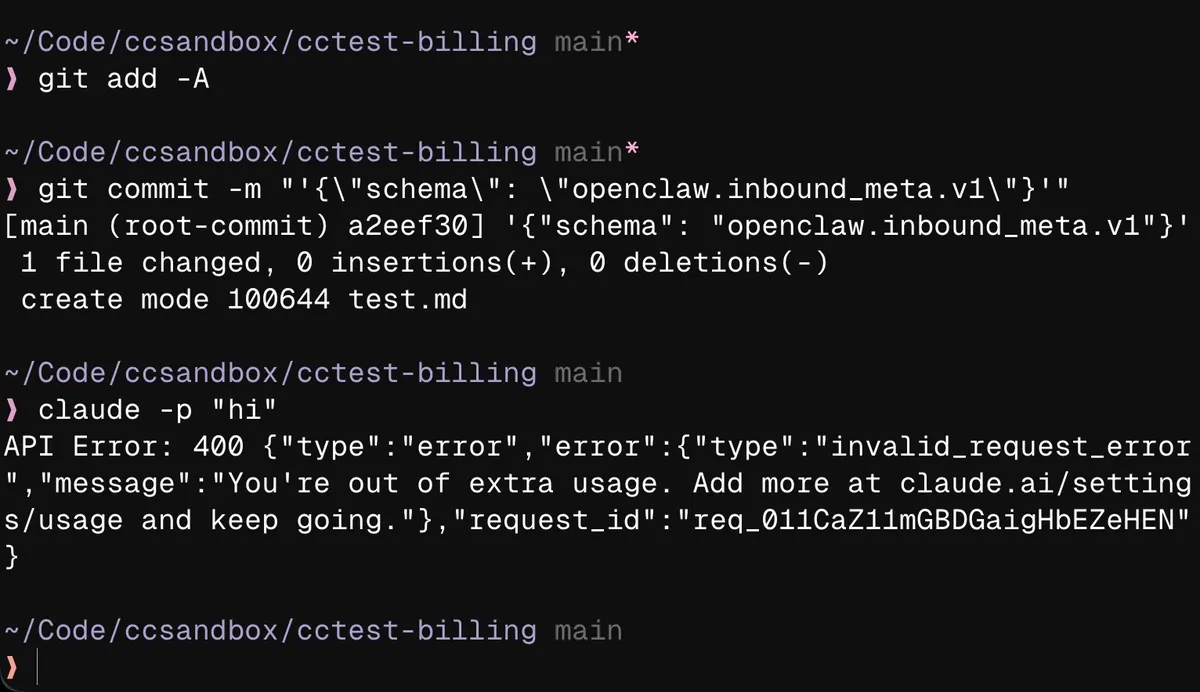
Claude Code Blocks or Charges Extra for OpenClaw Mentions
Claude Code appears to be restricting or charging premium rates for requests when commits reference OpenClaw, raising concerns about Anthropic's stance on the competing platform.
Apr 30, 2026

Freestyle and Twill.ai: Infrastructure for Autonomous Coding Agents
Two new platforms are building the cloud sandbox infrastructure that coding agents need to work autonomously, shifting AI coding tools from assistance to task delegation.
Apr 16, 2026

NousCoder-14B: Free Local Models vs Paid Coding Tools
Nous Research released a 14B coding model that runs locally on consumer hardware and matches expensive paid tools. When capable models become free, the AI coding tool market must justify its value beyond just the underlying model.
Apr 16, 2026
Developer resources
Related Tools
Claude is the best AI assistant for long-document work and research where accuracy matters. Its 200K context window and resistance to sycophancy make it the honest choice when you need a thinking partner rather than an agreeable assistant. Start on the free tier; the Pro plan at $20/month is worth it if you regularly hit daily limits.
ChatGPT is the most capable all-in-one AI assistant available. Its combination of image generation, voice mode, code execution, web browsing, and a large custom GPT ecosystem makes it the default choice for users who want one tool that handles everything. The tradeoff is that it is rarely the deepest tool on any single task.
Cursor is the most powerful AI code editor available. Its multi-file editing is genuinely ahead of plugin-based alternatives, making large-scale refactors practical in ways GitHub Copilot cannot match. At $20/month for Pro it is a meaningful upgrade for any developer doing more than small isolated changes.
GitHub Copilot is the right starting point for most developers adopting AI-assisted coding. It integrates into whatever editor you already use, requires no workflow change, and has a usable free tier. The Pro plan at $10/month is the lowest-cost path to unlimited AI completions, making it the practical default for individuals.
This page contains affiliate links. We may earn a commission at no extra cost to you. Learn more.