MarkUp
Annotate live web pages and export a design brief your AI coding assistant can follow
Editorial take
It is best suited for developers and agencies who use ai coding agents to make front-end changes. A free plan is available, with paid plans starting at $6/mo.
What is MarkUp?
MarkUp is a Chrome extension from Implement AI for briefing AI assistants on web page changes. You draw on the live page with seven annotation tools, and each numbered callout is added to a changelog. One click copies a PNG plus a markdown changelog with the CSS selector of each marked element, which you can paste into Claude, ChatGPT or Copilot, or save to a project folder that Claude Code or Cursor watches. Annotations stay in the browser's local storage and no account is needed. MarkUp Pro ($6 a month or $149 one-time) adds an MCP server, run locally through npx, so Claude Code, OpenAI Codex, Cursor and Claude Desktop can read your latest annotations directly.
Best for
Developers and agencies who use AI coding agents to make front-end changes
Score breakdown (out of 5)
What you would use it for
- →Telling Claude Code or Cursor exactly which page elements to change
- →Turning client feedback on a live site into a numbered change brief
- →Reviewing a staging site and handing fixes to an AI coding agent
Pros & Cons
👍 Pros
- ✓Core extension is free with no account
- ✓CSS selectors give AI agents the exact element to change
- ✓Annotations stay on your device
- ✓Export works with any AI assistant that accepts images or files
👎 Cons
- ✗Chromium browsers only for now (Safari version announced as coming soon)
- ✗Direct agent access through MCP requires Pro
- ✗No team plan yet (announced as in the works)
- ✗ChatGPT's chat app cannot use the local MCP server
Key Features
- ✓ Seven annotation tools on any live page
- ✓ Auto-numbered callouts with a live changelog
- ✓ PNG plus markdown export with CSS selectors
- ✓ Save exports to a local workspace folder
- ✓ Works in Chrome, Edge, Brave and Arc
- ✓ MCP server for coding agents (Pro)
Available on
Integrates with
MarkUp Pricing
✅ MarkUp has a free plan - no credit card required to start.
Free
- ✓All 7 annotation tools
- ✓Numbered callouts with automatic changelog
- ✓Clipboard export and workspace folder save
- ✓No account needed
Pro
- ✓MCP server for Claude Code, OpenAI Codex, Cursor and Claude Desktop
- ✓One license covers the extension and MCP server, plus a spare activation
- ✓New Pro features included
Latest news
From the blog

ChatGPT Images 2.6 brings GIFs to every plan. The new API models cost the same but skip Batch.
OpenAI's November 4 update adds animated GIFs and saved reference images to ChatGPT and Codex, plus two API models, GPT-Image-2.6 Flare and Sunburst. What is confirmed, what the new models cost, and why Batch users should stay on 2.5 for now.
Nov 5, 2026

Google I/O 2026: Everything Developers Need to Know
Gemini 3.5, Gemini Omni, Google Antigravity CLI, AI Search, Workspace agents, and Android XR glasses - a complete breakdown of every major Google I/O 2026 announcement and what it means for developers.
May 23, 2026
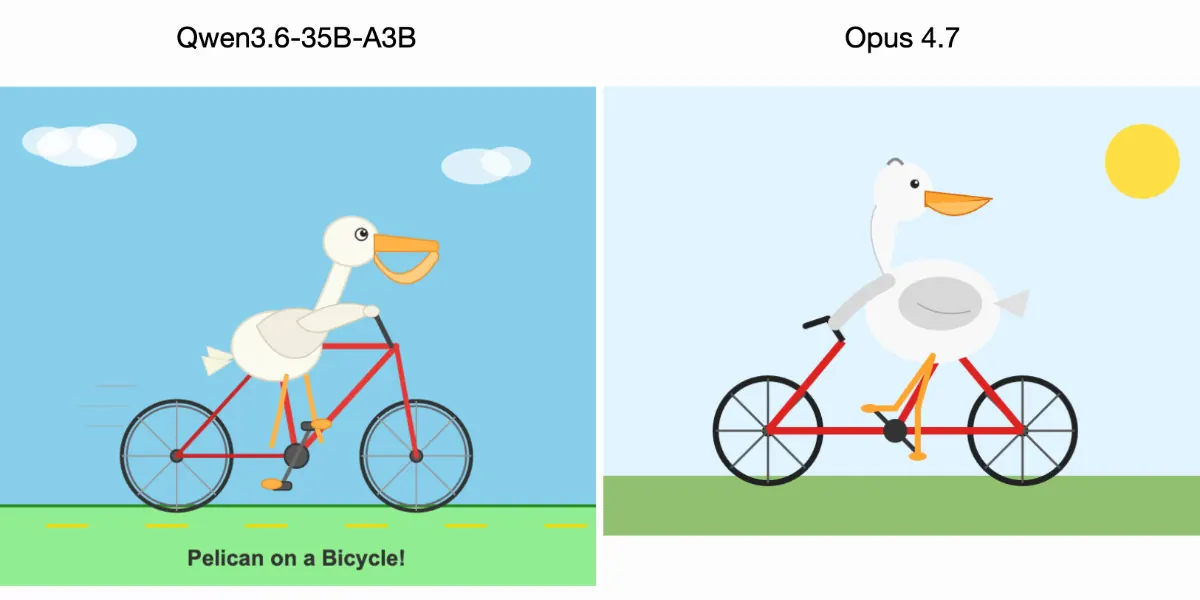
Qwen 35B Beats Claude Opus on SVG Drawing Tests
Simon Willison's pelican test had a local Qwen3.6-35B-A3B draw better SVG images than Claude Opus 4.7. One informal test says little about overall quality, but it shows where open models running on a laptop already compete with frontier AI at a fraction of the cost.
Apr 19, 2026
Developer resources
Related Tools
Claude is the best AI assistant for long-document work and research where accuracy matters. Its context window of up to 1M tokens and resistance to sycophancy make it the honest choice when you need a thinking partner rather than an agreeable assistant. Start on the free tier; the Pro plan at $20/month is worth it if you regularly hit the free usage limits, and Max ($100/month) or Ultra ($200/month) suit heavier daily use.
ChatGPT is the most capable all-in-one AI assistant available. Its combination of image generation, voice mode, code execution, web browsing, and a large custom GPT ecosystem makes it the default choice for users who want one tool that handles everything. The tradeoff is that it is rarely the deepest tool on any single task.
Cursor is the most powerful AI code editor available. Its multi-file editing is ahead of plugin-based alternatives, making large-scale refactors practical in ways GitHub Copilot cannot match. At $30/month for Premium (Grok models included, other models billed at API rates) it is a meaningful upgrade for any developer doing more than small isolated changes.
GitHub Copilot is the right starting point for developers adopting AI-assisted coding. It integrates into whatever editor you already use, requires no workflow change, and has a usable free tier. The Pro plan at $10/month is the lowest-cost path to unlimited AI completions, though chat and agent work now draw from a monthly credit allowance; heavy agent users should look at Pro+ ($39) or Max ($100).
This page contains affiliate links. We may earn a commission at no extra cost to you. Learn more.